What BlueMap works with.
| Platform | Java Edition |
|---|---|
| Loaders | Folia, Paper, Purpur, Spigot, Sponge |
| Minecraft versions | 1.16.5, 1.17.1, 1.18.2, 1.19.4, 1.20.1, 1.20.4, 1.21, 1.21.1, 1.21.4, 1.21.5, 1.21.11 |
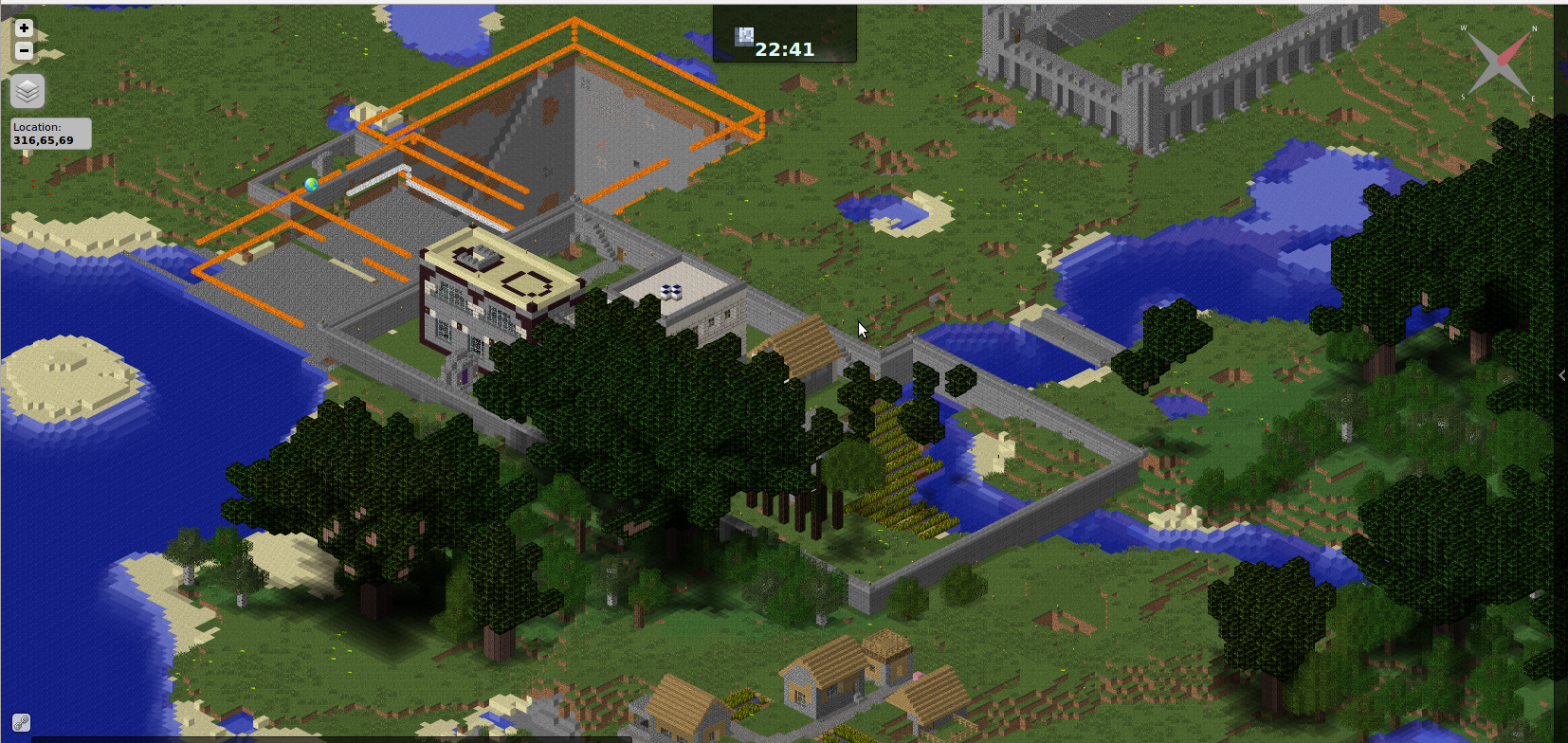
BlueMap is a server-side plugin that renders your Minecraft world as a real-time interactive 3D map accessible in any web browser. Drop the .jar into your plugins folder and BlueMap's built-in webserver starts serving a zoomable, rotatable 3D map of every loaded chunk. It runs on Paper, Spigot, Purpur, Folia, and Sponge across Minecraft 1.13 through 1.21, with no client-side install required from players.
How to Install BlueMap on Your Server
- 1.Download the BlueMap .jar for your server software from Modrinth.
- 2.Drop the file into your server's plugins/ folder.
- 3.Start or restart the server. BlueMap generates a default config and begins rendering loaded chunks.
- 4.Open http://your-server-ip:8100 in any browser to view the live map.
BlueMap's built-in webserver listens on port 8100 by default. Open that port in your firewall, or configure BlueMap to serve through a reverse proxy such as Nginx or Apache if you want it accessible on port 80 or 443.
Navigating the BlueMap Web Viewer
The web interface supports left-click to pan, scroll-wheel to zoom, and right-click or two-finger drag for 3D rotation. A sidebar shows live player positions, world selection, and zoom-level controls. Both a full 3D perspective mode and a flat top-down map mode are available, useful for exploring the world as well as server administration.
Configuration
BlueMap stores its config under plugins/BlueMap/. The key files and settings:
- core.conf: set accept-download: true to allow texture download for block rendering (required for block textures to appear).
- maps/<world>.conf: controls render quality, chunk update frequency, and map visibility per world.
- Optional SQL storage backends available for large installations instead of the default file system.
- Player marker display and live position updates can be toggled per world.
Compatibility and Performance
BlueMap is server-side only. Players need no client modification or browser extension to view the map. It integrates with server-installed resource packs to render custom block textures correctly in the web UI. Confirmed working on Paper, Spigot, Purpur, Folia (threaded-region fork), and Sponge. Installing directly on BungeeCord or Velocity proxies is not supported; install BlueMap on each backend server instead.
BlueMap vs Dynmap
BlueMap and Dynmap both serve live Minecraft world maps in a browser. BlueMap renders in full 3D using WebGL with free-camera rotation, while Dynmap renders isometric tiles and has a larger addon plugin ecosystem. BlueMap's resource pack support and 3D viewer make it the stronger choice for building and exploration servers; Dynmap's addon integrations may suit more complex or legacy setups.
How to Set Up a 3D Live Map with BlueMap
Questions about BlueMap.
5 questions
How do I install BlueMap on my Minecraft server?
Download the BlueMap .jar from Modrinth and place it in your server's plugins/ folder. Restart the server, then open http://your-server-ip:8100 in a browser. BlueMap begins rendering loaded chunks automatically after the first startup.
What port does BlueMap use?
BlueMap's built-in webserver listens on port 8100 by default. You can change this in plugins/BlueMap/webserver.conf, or set up a reverse proxy (Nginx, Apache) to forward traffic from port 80 or 443 to BlueMap's internal port.
Does BlueMap work with Folia?
Yes. BlueMap explicitly supports Folia, Paper's threaded-region server fork. Install and configure it the same way you would on a standard Paper server.
How is BlueMap different from Dynmap?
BlueMap renders a full 3D interactive WebGL map with free-camera rotation, while Dynmap renders flat isometric tiles. BlueMap supports resource packs for custom block textures in the web view. Dynmap has a larger addon ecosystem. Both provide live world maps in the browser, but BlueMap's 3D view is more visually capable.
Do players need to install anything to view the BlueMap map?
No. Players access the map through any web browser at the server's IP address and port 8100. No client mod, resource pack, or browser extension is needed on the player's side.